How to set up a loop while keeping the cursor active.
Sub LoopIt
If SchServer Is Nothing Then Exit Sub
Set CurrentSheet = SchServer.GetCurrentSchDocument
If CurrentSheet is Nothing Then Exit Sub
Set Alocation = CurrentSheet.Location
While CurrentSheet.ChooseLocationInteractively(Alocation,"Select Label")
'tempStr = LocationtoStr(Alocation)
ShowMessage("Location: " & CoordToMils(Alocation.X)_
& "," & CoordToMils(Alocation.Y))
Wend
www.tdpcb.com
End Sub
Altium Designer Script Information in VB for PCB Layout and Schematic Capture by Bill Smock from Tru Designs, San Diego, CA.
Tuesday, July 05, 2011
Thursday, June 30, 2011
Hit Test Usage for Schematic
Using the ChooseLocationInteractively function to determine what is located at the cursor location when it is clicked. The HitTest stores all of the objects located at the cursor when clicked.
Sub HitTestExample
If SchServer Is Nothing Then Exit Sub
Set CurrentSheet = SchServer.GetCurrentSchDocument
If CurrentSheet is Nothing Then Exit Sub
Set Alocation = CurrentSheet.Location
Call CurrentSheet.ChooseLocationInteractively(Alocation,"Select Label")
Set HitTest = CurrentSheet.CreateHitTest(eHitTest_AllObjects, ALocation)
If (HitTest.HitTestCount > 0) Then
For I = 0 to (HitTest.HitTestCount-1)
ShowMessage ("ObjectID Is " & HitTest.HitObject(I).ObjectId)
Next
End If
End Sub
www.tdpcb.com
Sub HitTestExample
If SchServer Is Nothing Then Exit Sub
Set CurrentSheet = SchServer.GetCurrentSchDocument
If CurrentSheet is Nothing Then Exit Sub
Set Alocation = CurrentSheet.Location
Call CurrentSheet.ChooseLocationInteractively(Alocation,"Select Label")
Set HitTest = CurrentSheet.CreateHitTest(eHitTest_AllObjects, ALocation)
If (HitTest.HitTestCount > 0) Then
For I = 0 to (HitTest.HitTestCount-1)
ShowMessage ("ObjectID Is " & HitTest.HitObject(I).ObjectId)
Next
End If
End Sub
www.tdpcb.com
Labels:
ChooseLocation,
Hit Test,
Schematic
Friday, June 17, 2011
Renumbering PCB pads with a mouse click
Quick way to renumber pads, mostly useful in the pcb library editor.
Click on the pad with the first number and then click on the other pads and they will incremently change numbers.
Sub RenumberPads
Dim Board
Dim Rpad
Dim PadNumber
Set Board = PCBServer.GetCurrentPCBBoard
If Board is Nothing Then Exit Sub
Pcbserver.PreProcess
Set PadObject = Board.GetObjectAtCursor(MkSet(ePadObject),_
AllLayers,"Select Pad To Start With")
PadNumber = PadObject.Name + 1
While Board.ChooseLocation(x,y, "Click Next Pad To Renumber") = True
Set Rpad = Board.GetObjectAtXYAskUserIfAmbiguous(x,y,MkSet(_
ePadObject),AllLayers,eEditAction_Change)
If Not(Rpad is Nothing) Then
Call PCBServer.SendMessageToRobots(Rpad.I_ObjectAddress,_
c_Broadcast, PCBM_BeginModify, c_NoEventData)
Rpad.Name = PadNumber
Call PCBServer.SendMessageToRobots(Rpad.I_ObjectAddress,_
c_Broadcast, PCBM_EndModify , c_NoEventData)
End If
PadNumber = PadNumber + 1
Wend
Pcbserver.PostProcess
ResetParameters
Call AddStringParameter("Action", "Redraw")
RunProcess("PCB:Zoom")
End Sub
www.tdpcb.com
Click on the pad with the first number and then click on the other pads and they will incremently change numbers.
Sub RenumberPads
Dim Board
Dim Rpad
Dim PadNumber
Set Board = PCBServer.GetCurrentPCBBoard
If Board is Nothing Then Exit Sub
Pcbserver.PreProcess
Set PadObject = Board.GetObjectAtCursor(MkSet(ePadObject),_
AllLayers,"Select Pad To Start With")
PadNumber = PadObject.Name + 1
While Board.ChooseLocation(x,y, "Click Next Pad To Renumber") = True
Set Rpad = Board.GetObjectAtXYAskUserIfAmbiguous(x,y,MkSet(_
ePadObject),AllLayers,eEditAction_Change)
If Not(Rpad is Nothing) Then
Call PCBServer.SendMessageToRobots(Rpad.I_ObjectAddress,_
c_Broadcast, PCBM_BeginModify, c_NoEventData)
Rpad.Name = PadNumber
Call PCBServer.SendMessageToRobots(Rpad.I_ObjectAddress,_
c_Broadcast, PCBM_EndModify , c_NoEventData)
End If
PadNumber = PadNumber + 1
Wend
Pcbserver.PostProcess
ResetParameters
Call AddStringParameter("Action", "Redraw")
RunProcess("PCB:Zoom")
End Sub
www.tdpcb.com
Wednesday, June 15, 2011
Via Rules
Get the details of the via routing style rule.
Sub GetViaRule
Dim Board
Dim tmpStr
Set Board = PCBServer.GetCurrentPCBBoard
If Board is Nothing Then Exit Sub
Iterator = Board.BoardIterator_Create
Iterator.AddFilter_ObjectSet(MkSet(eRuleObject))
Iterator.AddFilter_LayerSet(AllLayers)
Iterator.AddFilter_Method(eProcessAll)
Set Rule = Iterator.FirstPCBObject
While Not (Rule Is Nothing)
If Rule.Rulekind = eRule_RoutingViaStyle Then
tmpStr = "Name: " & Rule.Name & vbcrlf
tmpStr = tmpStr & "Pref Via Width: " & CoordtoMils(Rule.PreferedWidth)
tmpStr = tmpStr & "mils" & vbcrlf
tmpStr = tmpStr & "Min Via Width: " & CoordtoMils(Rule.MinWidth)
tmpStr = tmpStr & "mils" & vbcrlf
tmpStr = tmpStr & "Max Via Width: " & CoordtoMils(Rule.MaxWidth)
tmpStr = tmpStr & "mils" & vbcrlf
tmpStr = tmpStr & "Pref Via Hole Width: " & CoordtoMils(Rule.PreferedHoleWidth)
tmpStr = tmpStr & "mils" & vbcrlf
tmpStr = tmpStr & "Min Via Hole Width: " & CoordtoMils(Rule.MinHoleWidth)
tmpStr = tmpStr & "mils" & vbcrlf
tmpStr = tmpStr & "Max Via Hole Width: " & CoordtoMils(Rule.MaxHoleWidth)
tmpStr = tmpStr & "mils" & vbcrlf
tmpStr = tmpStr & "Scope1: " & Rule.Scope1Expression & vbcrlf
tmpStr = tmpStr & "Scope2: " & Rule.Scope2Expression
ShowMessage( tmpStr )
End If
Set Rule = Iterator.NextPCBObject
Wend
Board.BoardIterator_Destroy(Iterator)
End Sub
www.tdpcb.com
Sub GetViaRule
Dim Board
Dim tmpStr
Set Board = PCBServer.GetCurrentPCBBoard
If Board is Nothing Then Exit Sub
Iterator = Board.BoardIterator_Create
Iterator.AddFilter_ObjectSet(MkSet(eRuleObject))
Iterator.AddFilter_LayerSet(AllLayers)
Iterator.AddFilter_Method(eProcessAll)
Set Rule = Iterator.FirstPCBObject
While Not (Rule Is Nothing)
If Rule.Rulekind = eRule_RoutingViaStyle Then
tmpStr = "Name: " & Rule.Name & vbcrlf
tmpStr = tmpStr & "Pref Via Width: " & CoordtoMils(Rule.PreferedWidth)
tmpStr = tmpStr & "mils" & vbcrlf
tmpStr = tmpStr & "Min Via Width: " & CoordtoMils(Rule.MinWidth)
tmpStr = tmpStr & "mils" & vbcrlf
tmpStr = tmpStr & "Max Via Width: " & CoordtoMils(Rule.MaxWidth)
tmpStr = tmpStr & "mils" & vbcrlf
tmpStr = tmpStr & "Pref Via Hole Width: " & CoordtoMils(Rule.PreferedHoleWidth)
tmpStr = tmpStr & "mils" & vbcrlf
tmpStr = tmpStr & "Min Via Hole Width: " & CoordtoMils(Rule.MinHoleWidth)
tmpStr = tmpStr & "mils" & vbcrlf
tmpStr = tmpStr & "Max Via Hole Width: " & CoordtoMils(Rule.MaxHoleWidth)
tmpStr = tmpStr & "mils" & vbcrlf
tmpStr = tmpStr & "Scope1: " & Rule.Scope1Expression & vbcrlf
tmpStr = tmpStr & "Scope2: " & Rule.Scope2Expression
ShowMessage( tmpStr )
End If
Set Rule = Iterator.NextPCBObject
Wend
Board.BoardIterator_Destroy(Iterator)
End Sub
www.tdpcb.com
Monday, June 13, 2011
PCB rules and how to access them.
Get access to the PCB rules. Get the width rules and list the details.
Sub GetWidthRule
Dim Board
Dim tmpStr
Set Board = PCBServer.GetCurrentPCBBoard
If Board is Nothing Then Exit Sub
Iterator = Board.BoardIterator_Create
Iterator.AddFilter_ObjectSet(MkSet(eRuleObject))
Iterator.AddFilter_LayerSet(AllLayers)
Iterator.AddFilter_Method(eProcessAll)
Set Rule = Iterator.FirstPCBObject
While Not (Rule Is Nothing)
If Rule.Rulekind = eRule_MaxMinWidth Then
tmpStr = "Name: " & Rule.Name & vbcrlf
tmpStr = tmpStr & "Preferred: " & CoordtoMils(Rule.FavoredWidth(eTopLayer))
tmpStr = tmpStr & "mils" & vbcrlf
tmpStr = tmpStr & "Minimum: " & CoordtoMils(Rule.MinWidth(eTopLayer))
tmpStr = tmpStr & "mils" & vbcrlf
tmpStr = tmpStr & "Maximum: " & CoordtoMils(Rule.MaxWidth(eTopLayer))
tmpStr = tmpStr & "mils" & vbcrlf
tmpStr = tmpStr & "Scope1: " & Rule.Scope1Expression & vbcrlf
tmpStr = tmpStr & "Scope2: " & Rule.Scope2Expression
ShowMessage( tmpStr )
End If
Set Rule = Iterator.NextPCBObject
Wend
Board.BoardIterator_Destroy(Iterator)
End Sub
www.tdpcb.com
A list of available rules:
eRule_Clearance,
eRule_ParallelSegment,
eRule_MaxMinWidth,
eRule_MaxMinLength,
eRule_MatchedLengths,
eRule_DaisyChainStubLength,
eRule_PowerPlaneConnectStyle,
eRule_RoutingTopology,
eRule_RoutingPriority,
eRule_RoutingLayers,
eRule_RoutingCornerStyle,
eRule_RoutingViaStyle,
eRule_PowerPlaneClearance,
eRule_SolderMaskExpansion,
eRule_PasteMaskExpansion,
eRule_ShortCircuit,
eRule_BrokenNets,
eRule_ViasUnderSMD,
eRule_MaximumViaCount,
eRule_MinimumAnnularRing,
eRule_PolygonConnectStyle,
eRule_AcuteAngle,
eRule_ConfinementConstraint,
eRule_SMDToCorner,
eRule_ComponentClearance,
eRule_ComponentRotations,
eRule_PermittedLayers,
eRule_NetsToIgnore,
eRule_SignalStimulus,
eRule_Overshoot_FallingEdge,
eRule_Overshoot_RisingEdge,
eRule_Undershoot_FallingEdge,
eRule_Undershoot_RisingEdge,
eRule_MaxMinImpedance,
eRule_SignalTopValue,
eRule_SignalBaseValue,
eRule_FlightTime_RisingEdge,
eRule_FlightTime_FallingEdge,
eRule_LayerStack,
eRule_MaxSlope_RisingEdge,
eRule_MaxSlope_FallingEdge,
eRule_SupplyNets,
eRule_MaxMinHoleSize,
eRule_TestPointStyle,
eRule_TestPointUsage
Sub GetWidthRule
Dim Board
Dim tmpStr
Set Board = PCBServer.GetCurrentPCBBoard
If Board is Nothing Then Exit Sub
Iterator = Board.BoardIterator_Create
Iterator.AddFilter_ObjectSet(MkSet(eRuleObject))
Iterator.AddFilter_LayerSet(AllLayers)
Iterator.AddFilter_Method(eProcessAll)
Set Rule = Iterator.FirstPCBObject
While Not (Rule Is Nothing)
If Rule.Rulekind = eRule_MaxMinWidth Then
tmpStr = "Name: " & Rule.Name & vbcrlf
tmpStr = tmpStr & "Preferred: " & CoordtoMils(Rule.FavoredWidth(eTopLayer))
tmpStr = tmpStr & "mils" & vbcrlf
tmpStr = tmpStr & "Minimum: " & CoordtoMils(Rule.MinWidth(eTopLayer))
tmpStr = tmpStr & "mils" & vbcrlf
tmpStr = tmpStr & "Maximum: " & CoordtoMils(Rule.MaxWidth(eTopLayer))
tmpStr = tmpStr & "mils" & vbcrlf
tmpStr = tmpStr & "Scope1: " & Rule.Scope1Expression & vbcrlf
tmpStr = tmpStr & "Scope2: " & Rule.Scope2Expression
ShowMessage( tmpStr )
End If
Set Rule = Iterator.NextPCBObject
Wend
Board.BoardIterator_Destroy(Iterator)
End Sub
www.tdpcb.com
A list of available rules:
eRule_Clearance,
eRule_ParallelSegment,
eRule_MaxMinWidth,
eRule_MaxMinLength,
eRule_MatchedLengths,
eRule_DaisyChainStubLength,
eRule_PowerPlaneConnectStyle,
eRule_RoutingTopology,
eRule_RoutingPriority,
eRule_RoutingLayers,
eRule_RoutingCornerStyle,
eRule_RoutingViaStyle,
eRule_PowerPlaneClearance,
eRule_SolderMaskExpansion,
eRule_PasteMaskExpansion,
eRule_ShortCircuit,
eRule_BrokenNets,
eRule_ViasUnderSMD,
eRule_MaximumViaCount,
eRule_MinimumAnnularRing,
eRule_PolygonConnectStyle,
eRule_AcuteAngle,
eRule_ConfinementConstraint,
eRule_SMDToCorner,
eRule_ComponentClearance,
eRule_ComponentRotations,
eRule_PermittedLayers,
eRule_NetsToIgnore,
eRule_SignalStimulus,
eRule_Overshoot_FallingEdge,
eRule_Overshoot_RisingEdge,
eRule_Undershoot_FallingEdge,
eRule_Undershoot_RisingEdge,
eRule_MaxMinImpedance,
eRule_SignalTopValue,
eRule_SignalBaseValue,
eRule_FlightTime_RisingEdge,
eRule_FlightTime_FallingEdge,
eRule_LayerStack,
eRule_MaxSlope_RisingEdge,
eRule_MaxSlope_FallingEdge,
eRule_SupplyNets,
eRule_MaxMinHoleSize,
eRule_TestPointStyle,
eRule_TestPointUsage
Wednesday, June 08, 2011
Swap Component Positions
This will swap the positions of two components that are choosen, including the rotation of the part and the rotation and position of the designators. Based on a script that came with Summer '09 but more useful. If a component is not selected the script will end to avoid a crash.
Sub SwapComps
Dim Board
Dim CompA
Dim CompB
Dim CompX
Dim CompY
Dim CompR
Dim DesX
Dim DesY
Dim DesR
Set Board = PCBServer.GetCurrentPCBBoard
If Board is Nothing Then Exit Sub
Pcbserver.PreProcess
While Board.ChooseLocation(x,y, "Select First Componet") = True
Set CompA = Board.GetObjectAtXYAskUserIfAmbiguous(x,y,MkSet(eComponentObject)_
,AllLayers, eEditAction_Select)
If CompA Is Nothing Then Exit Sub 'Needed, if no comp is selected, crash
Call Board.ChooseLocation(x,y, "Select Second Componet")
Set CompB = Board.GetObjectAtXYAskUserIfAmbiguous(x,y,MkSet(eComponentObject)_
,AllLayers, eEditAction_Select)
If CompB Is Nothing Then Exit Sub 'Needed, if no comp is selected, crash
CompX = CompA.X
CompY = CompA.Y
CompR = CompA.Rotation
DesX = CompA.Name.XLocation
DesY = CompA.Name.YLocation
DesR = CompA.Name.Rotation
Call PCBServer.SendMessageToRobots(CompA.I_ObjectAddress,c_Broadcast,_
PCBM_BeginModify, c_NoEventData)
CompA.X = CompB.X
CompA.Y = CompB.Y
CompA.Rotation = CompB.Rotation
CompA.ChangeNameAutoposition = eAutoPos_Manual
Call PCBServer.SendMessageToRobots(CompA.I_ObjectAddress,c_Broadcast,_
PCBM_EndModify , c_NoEventData)
Call PCBServer.SendMessageToRobots(CompA.Name.I_ObjectAddress, c_Broadcast,_
PCBM_BeginModify, c_NoEventData)
CompA.Name.XLocation = CompB.Name.XLocation
CompA.Name.YLocation = CompB.Name.YLocation
CompA.Name.Rotation = CompB.Name.Rotation
Call PCBServer.SendMessageToRobots(CompA.Name.I_ObjectAddress, c_Broadcast,_
PCBM_EndModify , c_NoEventData)
Call PCBServer.SendMessageToRobots(CompB.I_ObjectAddress,c_Broadcast,_
PCBM_BeginModify, c_NoEventData)
CompB.X = CompX
CompB.Y = CompY
CompB.Rotation = CompR
CompB.ChangeNameAutoposition = eAutoPos_Manual
Call PCBServer.SendMessageToRobots(CompB.I_ObjectAddress,c_Broadcast,_
PCBM_EndModify , c_NoEventData)
Call PCBServer.SendMessageToRobots(CompB.Name.I_ObjectAddress, c_Broadcast,_
PCBM_BeginModify, c_NoEventData)
CompB.Name.XLocation = DesX
CompB.Name.YLocation = DesY
CompB.Name.Rotation = DesR
Call PCBServer.SendMessageToRobots(CompB.Name.I_ObjectAddress, c_Broadcast,_
PCBM_EndModify , c_NoEventData)
Wend
Pcbserver.PostProcess
ResetParameters
Call AddStringParameter("Action", "Redraw")
RunProcess("PCB:Zoom")
End Sub
www.tdpcb.com
Sub SwapComps
Dim Board
Dim CompA
Dim CompB
Dim CompX
Dim CompY
Dim CompR
Dim DesX
Dim DesY
Dim DesR
Set Board = PCBServer.GetCurrentPCBBoard
If Board is Nothing Then Exit Sub
Pcbserver.PreProcess
While Board.ChooseLocation(x,y, "Select First Componet") = True
Set CompA = Board.GetObjectAtXYAskUserIfAmbiguous(x,y,MkSet(eComponentObject)_
,AllLayers, eEditAction_Select)
If CompA Is Nothing Then Exit Sub 'Needed, if no comp is selected, crash
Call Board.ChooseLocation(x,y, "Select Second Componet")
Set CompB = Board.GetObjectAtXYAskUserIfAmbiguous(x,y,MkSet(eComponentObject)_
,AllLayers, eEditAction_Select)
If CompB Is Nothing Then Exit Sub 'Needed, if no comp is selected, crash
CompX = CompA.X
CompY = CompA.Y
CompR = CompA.Rotation
DesX = CompA.Name.XLocation
DesY = CompA.Name.YLocation
DesR = CompA.Name.Rotation
Call PCBServer.SendMessageToRobots(CompA.I_ObjectAddress,c_Broadcast,_
PCBM_BeginModify, c_NoEventData)
CompA.X = CompB.X
CompA.Y = CompB.Y
CompA.Rotation = CompB.Rotation
CompA.ChangeNameAutoposition = eAutoPos_Manual
Call PCBServer.SendMessageToRobots(CompA.I_ObjectAddress,c_Broadcast,_
PCBM_EndModify , c_NoEventData)
Call PCBServer.SendMessageToRobots(CompA.Name.I_ObjectAddress, c_Broadcast,_
PCBM_BeginModify, c_NoEventData)
CompA.Name.XLocation = CompB.Name.XLocation
CompA.Name.YLocation = CompB.Name.YLocation
CompA.Name.Rotation = CompB.Name.Rotation
Call PCBServer.SendMessageToRobots(CompA.Name.I_ObjectAddress, c_Broadcast,_
PCBM_EndModify , c_NoEventData)
Call PCBServer.SendMessageToRobots(CompB.I_ObjectAddress,c_Broadcast,_
PCBM_BeginModify, c_NoEventData)
CompB.X = CompX
CompB.Y = CompY
CompB.Rotation = CompR
CompB.ChangeNameAutoposition = eAutoPos_Manual
Call PCBServer.SendMessageToRobots(CompB.I_ObjectAddress,c_Broadcast,_
PCBM_EndModify , c_NoEventData)
Call PCBServer.SendMessageToRobots(CompB.Name.I_ObjectAddress, c_Broadcast,_
PCBM_BeginModify, c_NoEventData)
CompB.Name.XLocation = DesX
CompB.Name.YLocation = DesY
CompB.Name.Rotation = DesR
Call PCBServer.SendMessageToRobots(CompB.Name.I_ObjectAddress, c_Broadcast,_
PCBM_EndModify , c_NoEventData)
Wend
Pcbserver.PostProcess
ResetParameters
Call AddStringParameter("Action", "Redraw")
RunProcess("PCB:Zoom")
End Sub
www.tdpcb.com
Labels:
Components,
Designators,
Rotation,
Swap
Monday, June 06, 2011
Set the DRC error for a component
Simple test to look for the "R2" componet and set it's DRC flag.
Sub SetDRC
Dim Board
Dim CompDes
Set Board = PCBServer.GetCurrentPCBBoard
If Board is Nothing Then Exit Sub
Iterator = Board.BoardIterator_Create
Iterator.AddFilter_ObjectSet(MkSet(eComponentObject))
Iterator.AddFilter_LayerSet(AllLayers)
Iterator.AddFilter_Method(eProcessComponents)
Set CompDes = Iterator.FirstPCBObject
PCBServer.PreProcess
While Not(CompDes Is Nothing)
If CompDes.Name.Text = "R2" then
CompDes.SetState_DRCError = True
End If
Set CompDes = Iterator.NextPCBObject
Wend
Board.BoardIterator_Destroy(Iterator)
Pcbserver.PostProcess
ResetParameters
Call AddStringParameter("Action", "Redraw")
RunProcess("PCB:Zoom")
End Sub
www.tdpcb.com
Sub SetDRC
Dim Board
Dim CompDes
Set Board = PCBServer.GetCurrentPCBBoard
If Board is Nothing Then Exit Sub
Iterator = Board.BoardIterator_Create
Iterator.AddFilter_ObjectSet(MkSet(eComponentObject))
Iterator.AddFilter_LayerSet(AllLayers)
Iterator.AddFilter_Method(eProcessComponents)
Set CompDes = Iterator.FirstPCBObject
PCBServer.PreProcess
While Not(CompDes Is Nothing)
If CompDes.Name.Text = "R2" then
CompDes.SetState_DRCError = True
End If
Set CompDes = Iterator.NextPCBObject
Wend
Board.BoardIterator_Destroy(Iterator)
Pcbserver.PostProcess
ResetParameters
Call AddStringParameter("Action", "Redraw")
RunProcess("PCB:Zoom")
End Sub
Labels:
Components,
Designators,
DRC
Friday, June 03, 2011
Clone a net from one object to another
I can see this one as being a little dangerous, it's meant to show how to click an object with a net and then any pad, via, or track that you click (that already has a net assigned) will then be changed to the first net that was choosen.
Sub CloneNet
Dim Board
Dim NetObject
Dim Borg
Set Board = PCBServer.GetCurrentPCBBoard
If Board is Nothing Then Exit Sub
NetObject = Board.GetObjectAtCursor(MkSet(ePadObject,eTrackObject,eViaObject)_
,AllLayers,"Select Net to Clone")
Call PCBServer.PreProcess
While Board.ChooseLocation(x,y, "Click Item To Change") = True
Set Borg = Board.GetObjectAtXYAskUserIfAmbiguous(x,y,MkSet(_
ePadObject,eTrackObject,eViaObject),AllLayers,eEditAction_Change)
If Not(Borg is Nothing) Then
Call PCBServer.SendMessageToRobots(Borg.I_ObjectAddress,_
c_Broadcast, PCBM_BeginModify, c_NoEventData)
Borg.Net = NetObject.Net
Call PCBServer.SendMessageToRobots(Borg.I_ObjectAddress,_
c_Broadcast, PCBM_EndModify , c_NoEventData)
End If
Wend
Call PCBServer.PostProcess
ResetParameters
Call AddStringParameter("Action", "Redraw")
RunProcess("PCB:Zoom")
End Sub
www.tdpcb.com
Sub CloneNet
Dim Board
Dim NetObject
Dim Borg
Set Board = PCBServer.GetCurrentPCBBoard
If Board is Nothing Then Exit Sub
NetObject = Board.GetObjectAtCursor(MkSet(ePadObject,eTrackObject,eViaObject)_
,AllLayers,"Select Net to Clone")
Call PCBServer.PreProcess
While Board.ChooseLocation(x,y, "Click Item To Change") = True
Set Borg = Board.GetObjectAtXYAskUserIfAmbiguous(x,y,MkSet(_
ePadObject,eTrackObject,eViaObject),AllLayers,eEditAction_Change)
If Not(Borg is Nothing) Then
Call PCBServer.SendMessageToRobots(Borg.I_ObjectAddress,_
c_Broadcast, PCBM_BeginModify, c_NoEventData)
Borg.Net = NetObject.Net
Call PCBServer.SendMessageToRobots(Borg.I_ObjectAddress,_
c_Broadcast, PCBM_EndModify , c_NoEventData)
End If
Wend
Call PCBServer.PostProcess
ResetParameters
Call AddStringParameter("Action", "Redraw")
RunProcess("PCB:Zoom")
End Sub
www.tdpcb.com
Wednesday, June 01, 2011
Count selected objects
How many objects are currently selected on the PCB.
Sub CountSelObj
Dim Board
Set Board = PCBServer.GetCurrentPCBBoard
If Board is Nothing Then Exit Sub
ShowMessage (Board.SelectecObjectCount & " Items are selected.")
End Sub
www.tdpcb.com
Sub CountSelObj
Dim Board
Set Board = PCBServer.GetCurrentPCBBoard
If Board is Nothing Then Exit Sub
ShowMessage (Board.SelectecObjectCount & " Items are selected.")
End Sub
www.tdpcb.com
Labels:
Select
Thursday, May 26, 2011
Toggle Component Designators
Toggle all component designators on PCB from shown to hidden.
Sub ToggleDesignators
Dim Board
Dim Component
Set Board = PCBServer.GetCurrentPCBBoard
If Board is Nothing Then Exit Sub
Iterator = Board.BoardIterator_Create
Iterator.AddFilter_ObjectSet(MkSet(eComponentObject))
Iterator.AddFilter_LayerSet(AllLayers)
Iterator.AddFilter_Method(eProcessAll)
Set Component= Iterator.FirstPCBObject
PCBServer.PreProcess
While Not(Component is Nothing)
Component.NameOn = Not(Component.NameOn)
Set Component= Iterator.NextPCBObject
Wend
Board.BoardIterator_Destroy(Iterator)
Pcbserver.PostProcess
ResetParameters
Call AddStringParameter("Action", "Redraw")
RunProcess("PCB:Zoom")
End Sub
www.tdpcb.com
Sub ToggleDesignators
Dim Board
Dim Component
Set Board = PCBServer.GetCurrentPCBBoard
If Board is Nothing Then Exit Sub
Iterator = Board.BoardIterator_Create
Iterator.AddFilter_ObjectSet(MkSet(eComponentObject))
Iterator.AddFilter_LayerSet(AllLayers)
Iterator.AddFilter_Method(eProcessAll)
Set Component= Iterator.FirstPCBObject
PCBServer.PreProcess
While Not(Component is Nothing)
Component.NameOn = Not(Component.NameOn)
Set Component= Iterator.NextPCBObject
Wend
Board.BoardIterator_Destroy(Iterator)
Pcbserver.PostProcess
ResetParameters
Call AddStringParameter("Action", "Redraw")
RunProcess("PCB:Zoom")
End Sub
www.tdpcb.com
Labels:
Designators,
Toggle
Tuesday, May 24, 2011
Open a text file and read the contents line by line.
As written this needs to be run with a PCB file active.
Sub ReadTextFile
'Constants for File Handling
Const ForReading = 1
Const ForWriting = 2
Const ForAppending = 8
Const TristateUseDefault = -2
Const TristateTrue = -1
Const TristateFalse = 0
Dim Board
Dim FileName
Dim oFS
Dim oFile
Dim oStream
Set Board = PCBServer.GetCurrentPCBBoard
If Board is Nothing Then Exit Sub
'File Handling - Place a text file named "TextFile.txt" in
'the same directory as the current board that is open.
FileName=Left(Board.FileName, InstrRev(Board.FileName, "\") ) & "TextFile.txt"
'Check for the text file
If Not FileExists(FileName) Then
ShowMessage ( FileName & " was not found.")
Exit Sub
End If
Set oFS = CreateObject("Scripting.FileSystemObject")
Set oFile = oFS.GetFile(FileName)
Set oStream = oFile.OpenAsTextStream(ForReading, TristateUseDefault)
I = 1
'Read the file in
Do While Not oStream.AtEndOfStream
sRecord = oStream.ReadLine
ShowMessage ( "Line #" & I & " " & sRecord )
I = I + 1
Loop
oStream.Close
End Sub
www.tdpcb.com
Sub ReadTextFile
'Constants for File Handling
Const ForReading = 1
Const ForWriting = 2
Const ForAppending = 8
Const TristateUseDefault = -2
Const TristateTrue = -1
Const TristateFalse = 0
Dim Board
Dim FileName
Dim oFS
Dim oFile
Dim oStream
Set Board = PCBServer.GetCurrentPCBBoard
If Board is Nothing Then Exit Sub
'File Handling - Place a text file named "TextFile.txt" in
'the same directory as the current board that is open.
FileName=Left(Board.FileName, InstrRev(Board.FileName, "\") ) & "TextFile.txt"
'Check for the text file
If Not FileExists(FileName) Then
ShowMessage ( FileName & " was not found.")
Exit Sub
End If
Set oFS = CreateObject("Scripting.FileSystemObject")
Set oFile = oFS.GetFile(FileName)
Set oStream = oFile.OpenAsTextStream(ForReading, TristateUseDefault)
I = 1
'Read the file in
Do While Not oStream.AtEndOfStream
sRecord = oStream.ReadLine
ShowMessage ( "Line #" & I & " " & sRecord )
I = I + 1
Loop
oStream.Close
End Sub
www.tdpcb.com
Friday, May 20, 2011
Place a track and via with the choosen pad net assigned to them.
Select a pad with a net and a stinger (a track and a via) will be placed with the pads net.
Sub TagPadWithNet
Dim Board
Dim Track
Dim Via
Dim NetObject
Dim PadX
Dim PadY
Dim PadNet
Dim ViasSize
Dim ViaHole
Set Board = PCBServer.GetCurrentPCBBoard
If Board is Nothing Then Exit Sub
NetObject = Board.GetObjectAtCursor(MkSet(ePadObject),AllLayers,"Select Net")
PadX = CoordToMils(NetObject.X)
PadY = CoordToMils(NetObject.Y)
PadNet = NetObject.Net.Name
X1 = PadX
X2 = PadX - CoordToMils(NetObject.TopXSize) - 10
Y1 = PadY
Y2 = PadY
Layer = NetObject.Layer
Width = 10
Call PCBServer.PreProcess
'Add the Track
Track = PCBServer.PCBObjectFactory(eTrackObject, eNoDimension, eCreate_Default)
Track.X1 = MilsToCoord(X1)
Track.X2 = MilsToCoord(X2)
Track.Y1 = MilsToCoord(Y1)
Track.Y2 = MilsToCoord(Y2)
Track.Layer = Layer
Track.Net = NetObject.Net
Track.Width = MilsToCoord(Width)
Board.AddPCBObject(Track)
Call PCBServer.SendMessageToRobots(Board.I_ObjectAddress,_
c_Broadcast, PCBM_BoardRegisteration, Track.I_ObjectAddress)
'Add the via
ViaSize = 26
ViaHole = 12
Via = PCBServer.PCBObjectFactory(eViaObject, eNoDimension, eCreate_Default)
Via.X = MilsToCoord(X2)
Via.Y = MilsToCoord(Y2)
Via.Size = MilsToCoord(ViaSize)
Via.HoleSize = MilsToCoord(ViaHole)
Via.LowLayer = eTopLayer
Via.HighLayer = eBottomLayer
Via.Net = NetObject.Net
Board.AddPCBObject(Via)
Call PCBServer.SendMessageToRobots(Board.I_ObjectAddress,_
c_Broadcast, PCBM_BoardRegisteration, Via.I_ObjectAddress)
Call PCBServer.PostProcess
ResetParameters
Call AddStringParameter("Action", "Redraw")
RunProcess("PCB:Zoom")
End Sub
www.tdpcb.com
Sub TagPadWithNet
Dim Board
Dim Track
Dim Via
Dim NetObject
Dim PadX
Dim PadY
Dim PadNet
Dim ViasSize
Dim ViaHole
Set Board = PCBServer.GetCurrentPCBBoard
If Board is Nothing Then Exit Sub
NetObject = Board.GetObjectAtCursor(MkSet(ePadObject),AllLayers,"Select Net")
PadX = CoordToMils(NetObject.X)
PadY = CoordToMils(NetObject.Y)
PadNet = NetObject.Net.Name
X1 = PadX
X2 = PadX - CoordToMils(NetObject.TopXSize) - 10
Y1 = PadY
Y2 = PadY
Layer = NetObject.Layer
Width = 10
Call PCBServer.PreProcess
'Add the Track
Track = PCBServer.PCBObjectFactory(eTrackObject, eNoDimension, eCreate_Default)
Track.X1 = MilsToCoord(X1)
Track.X2 = MilsToCoord(X2)
Track.Y1 = MilsToCoord(Y1)
Track.Y2 = MilsToCoord(Y2)
Track.Layer = Layer
Track.Net = NetObject.Net
Track.Width = MilsToCoord(Width)
Board.AddPCBObject(Track)
Call PCBServer.SendMessageToRobots(Board.I_ObjectAddress,_
c_Broadcast, PCBM_BoardRegisteration, Track.I_ObjectAddress)
'Add the via
ViaSize = 26
ViaHole = 12
Via = PCBServer.PCBObjectFactory(eViaObject, eNoDimension, eCreate_Default)
Via.X = MilsToCoord(X2)
Via.Y = MilsToCoord(Y2)
Via.Size = MilsToCoord(ViaSize)
Via.HoleSize = MilsToCoord(ViaHole)
Via.LowLayer = eTopLayer
Via.HighLayer = eBottomLayer
Via.Net = NetObject.Net
Board.AddPCBObject(Via)
Call PCBServer.SendMessageToRobots(Board.I_ObjectAddress,_
c_Broadcast, PCBM_BoardRegisteration, Via.I_ObjectAddress)
Call PCBServer.PostProcess
ResetParameters
Call AddStringParameter("Action", "Redraw")
RunProcess("PCB:Zoom")
End Sub
www.tdpcb.com
Thursday, May 19, 2011
Get the board dimensions as defined by the board outline.
Sub BoardDimension
Dim Board
Set Board = PCBServer.GetCurrentPCBBoard
If Board is Nothing Then Exit Sub
ShowMessage ( "X=" & CoordToMils(Board.BoardOutline.BoundingRectangle.right _
- Board.BoardOutline.BoundingRectangle.left) & " mils,Y=" & _
CoordToMils(Board.BoardOutline.BoundingRectangle.top _
- Board.BoardOutline.BoundingRectangle.bottom) & " mils")
End Sub
www.tdpcb.com
Dim Board
Set Board = PCBServer.GetCurrentPCBBoard
If Board is Nothing Then Exit Sub
ShowMessage ( "X=" & CoordToMils(Board.BoardOutline.BoundingRectangle.right _
- Board.BoardOutline.BoundingRectangle.left) & " mils,Y=" & _
CoordToMils(Board.BoardOutline.BoundingRectangle.top _
- Board.BoardOutline.BoundingRectangle.bottom) & " mils")
End Sub
www.tdpcb.com
Wednesday, May 18, 2011
Identify a pads net.
Simple way to get a pads net.
Sub GetPadNet
Dim Board
Dim NetObject
Dim tmpString
Set Board = PCBServer.GetCurrentPCBBoard
If Board is Nothing Then Exit Sub
NetObject = Board.GetObjectAtCursor(MkSet(ePadObject),AllLayers,"Select Net")
tmpString = NetObject.Net.Name
ShowMessage (tmpString)
End Sub
www.tdpcb.com
Sub GetPadNet
Dim Board
Dim NetObject
Dim tmpString
Set Board = PCBServer.GetCurrentPCBBoard
If Board is Nothing Then Exit Sub
NetObject = Board.GetObjectAtCursor(MkSet(ePadObject),AllLayers,"Select Net")
tmpString = NetObject.Net.Name
ShowMessage (tmpString)
End Sub
www.tdpcb.com
Monday, May 16, 2011
Report a list of net names in PCB to a file.
Get a list of net names in the PCB and write a report (text file).
Sub ReportNets
Dim Board
Dim FileName
Dim ReportFile
Dim ReportDocument
Dim fso
BeginHourGlass
Set Board = PCBServer.GetCurrentPCBBoard
If Board is Nothing Then Exit Sub
FileName = Left(Board.FileName, InstrRev(Board.FileName, "\") ) & "ReportNets.txt"
Set fso = CreateObject("Scripting.FileSystemObject")
Set ReportFile = fso.CreateTextFile(FileName, True)
NetIterator = Board.BoardIterator_Create
NetIterator.AddFilter_ObjectSet(MkSet(eNetObject))
NetIterator.AddFilter_LayerSet(AllLayers)
NetIterator.AddFilter_Method(eProcessAll)
Set NetFound = NetIterator.FirstPCBObject
While Not (NetFound Is Nothing)
Call ReportFile.WriteLine( NetFound.Name )
Set NetFound = NetIterator.NextPCBObject
Wend
Board.BoardIterator_Destroy(NetIterator)
Call AddStringParameter("Action", "Redraw")
RunProcess("PCB:Zoom")
ReportFile.Close
Set ReportDocument = Client.OpenDocument("Text", FileName)
If Not (ReportDocument Is Nothing) Then
Client.ShowDocument(ReportDocument)
End If
EndHourGlass
End Sub
www.tdpcb.com
Sub ReportNets
Dim Board
Dim FileName
Dim ReportFile
Dim ReportDocument
Dim fso
BeginHourGlass
Set Board = PCBServer.GetCurrentPCBBoard
If Board is Nothing Then Exit Sub
FileName = Left(Board.FileName, InstrRev(Board.FileName, "\") ) & "ReportNets.txt"
Set fso = CreateObject("Scripting.FileSystemObject")
Set ReportFile = fso.CreateTextFile(FileName, True)
NetIterator = Board.BoardIterator_Create
NetIterator.AddFilter_ObjectSet(MkSet(eNetObject))
NetIterator.AddFilter_LayerSet(AllLayers)
NetIterator.AddFilter_Method(eProcessAll)
Set NetFound = NetIterator.FirstPCBObject
While Not (NetFound Is Nothing)
Call ReportFile.WriteLine( NetFound.Name )
Set NetFound = NetIterator.NextPCBObject
Wend
Board.BoardIterator_Destroy(NetIterator)
Call AddStringParameter("Action", "Redraw")
RunProcess("PCB:Zoom")
ReportFile.Close
Set ReportDocument = Client.OpenDocument("Text", FileName)
If Not (ReportDocument Is Nothing) Then
Client.ShowDocument(ReportDocument)
End If
EndHourGlass
End Sub
www.tdpcb.com
Labels:
File,
Net,
PCB File Name,
Report
Saturday, May 14, 2011
Basic's to write a report text file.
Run this with a PCB file active.
Sub WriteFile
Dim FileName
Dim ReportDocument
Dim fso
Set Board = PCBServer.GetCurrentPCBBoard
If Board is Nothing Then Exit Sub
'Run With a PCB file open
FileName = Left(Board.FileName, InstrRev(Board.FileName, "\") ) & "temp.Txt"
Set fso = CreateObject("Scripting.FileSystemObject")
Set ReportFile = fso.CreateTextFile(FileName, True)
Call ReportFile.WriteLine (Now)
Call ReportFile.WriteLine ("Report File Example")
ReportFile.Close
Set ReportDocument = Client.OpenDocument("Text", FileName)
If Not (ReportDocument Is Nothing) Then
Client.ShowDocument(ReportDocument)
End If
End Sub
www.tdpcb.com
Sub WriteFile
Dim FileName
Dim ReportDocument
Dim fso
Set Board = PCBServer.GetCurrentPCBBoard
If Board is Nothing Then Exit Sub
'Run With a PCB file open
FileName = Left(Board.FileName, InstrRev(Board.FileName, "\") ) & "temp.Txt"
Set fso = CreateObject("Scripting.FileSystemObject")
Set ReportFile = fso.CreateTextFile(FileName, True)
Call ReportFile.WriteLine (Now)
Call ReportFile.WriteLine ("Report File Example")
ReportFile.Close
Set ReportDocument = Client.OpenDocument("Text", FileName)
If Not (ReportDocument Is Nothing) Then
Client.ShowDocument(ReportDocument)
End If
End Sub
www.tdpcb.com
Friday, May 13, 2011
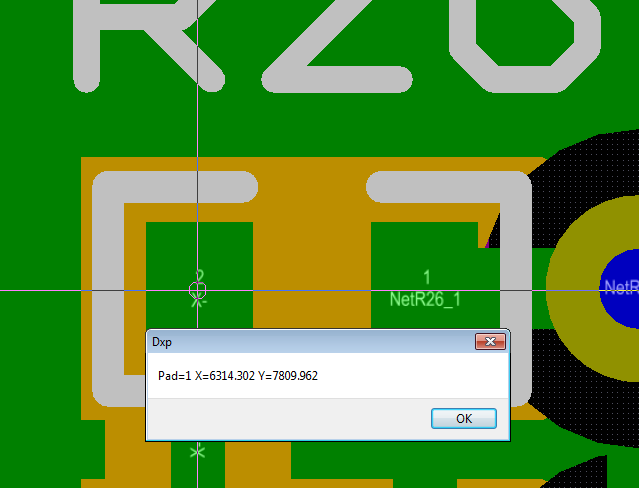
Get pads that make up a component using a group iterator.
Select a PCB component with the GetObject and then using a Group Iterator list all pads and the location of the pads that make up the choosen component.
Sub GetCompPads
Dim Board
Dim Comp
Dim CompGroup
Dim CompPads
Dim x,y
Set Board = PCBServer.GetCurrentPCBBoard
If Board is Nothing Then Exit Sub
While Board.ChooseLocation(x,y, "Choose Pad") = True
Set Comp = Board.GetObjectAtXYAskUserIfAmbiguous(x,y,MkSet(_
eComponentObject),AllLayers,eEditAction_Focus)
If Not(Comp is Nothing) Then
Set CompGroup = Comp.GroupIterator_Create
CompGroup.AddFilter_ObjectSet(MkSet(EpadObject))
Set CompPad = CompGroup.FirstPCBObject
While Not(CompPad is Nothing )
ShowMessage("Pad=" & CompPad.Name & " X=" & CoordToMils(CompPad.X)_
& " Y=" & CoordToMils(CompPad.Y))
Set CompPad = CompGroup.NextPCBObject
Wend
End If
Wend
End Sub
www.tdpcb.com
Sub GetCompPads
Dim Board
Dim Comp
Dim CompGroup
Dim CompPads
Dim x,y
Set Board = PCBServer.GetCurrentPCBBoard
If Board is Nothing Then Exit Sub
While Board.ChooseLocation(x,y, "Choose Pad") = True
Set Comp = Board.GetObjectAtXYAskUserIfAmbiguous(x,y,MkSet(_
eComponentObject),AllLayers,eEditAction_Focus)
If Not(Comp is Nothing) Then
Set CompGroup = Comp.GroupIterator_Create
CompGroup.AddFilter_ObjectSet(MkSet(EpadObject))
Set CompPad = CompGroup.FirstPCBObject
While Not(CompPad is Nothing )
ShowMessage("Pad=" & CompPad.Name & " X=" & CoordToMils(CompPad.X)_
& " Y=" & CoordToMils(CompPad.Y))
Set CompPad = CompGroup.NextPCBObject
Wend
End If
Wend
End Sub
www.tdpcb.com
Monday, May 09, 2011
Rotate and Center Designators of Selected Parts.
Build upon a previous script, rotate and center designators for only selected parts.
Sub RotateSelectedDesignators
Dim Board
Dim Component
Dim CompDes
Dim I
Set Board = PCBServer.GetCurrentPCBBoard
If Board is Nothing Then Exit Sub
BeginHourGlass
Iterator = Board.BoardIterator_Create
Iterator.AddFilter_ObjectSet(MkSet(eComponentObject))
Iterator.AddFilter_LayerSet(AllLayers)
Iterator.AddFilter_Method(eProcessAll)
Set CompDes = Iterator.FirstPCBObject
PCBServer.PreProcess
I = 0
While Not (CompDes Is Nothing)
If CompDes.Selected = True Then
Call PCBServer.SendMessageToRobots(CompDes.Name.I_ObjectAddress,_
c_Broadcast, PCBM_BeginModify, c_NoEventData)
I = I + 1
If CompDes.Layer = eTopLayer then 'Component is on the top
Select Case CompDes.Rotation
Case 0, 180, 360
CompDes.Name.Rotation = 0
Case 90, 270
CompDes.Name.Rotation = 90
End Select
else 'Component is on the bottom
Select Case CompDes.Rotation
Case 0, 180, 360
CompDes.Name.Rotation = 0
Case 90, 270
CompDes.Name.Rotation = 270
End Select
End If
Call PCBServer.SendMessageToRobots(CompDes.Name.I_ObjectAddress,_
c_Broadcast, PCBM_EndModify , c_NoEventData)
Call PCBServer.SendMessageToRobots(CompDes.Name.I_ObjectAddress,_
c_Broadcast, PCBM_BeginModify, c_NoEventData)
CompDes.ChangeNameAutoposition = eAutoPos_CenterCenter
Call PCBServer.SendMessageToRobots(CompDes.Name.I_ObjectAddress,_
c_Broadcast, PCBM_EndModify , c_NoEventData)
End if
Set CompDes = Iterator.NextPCBObject
Wend
'Uncomment this line if you want a message after it has finished.
'ShowMessage(I & " were found")
If I = 0 then
ShowMessage("No parts were selected.")
End If
Board.BoardIterator_Destroy(Iterator)
Pcbserver.PostProcess
EndHourGlass
Call AddStringParameter("Action", "Redraw")
RunProcess("PCB:Zoom")
End Sub
Sub RotateSelectedDesignators
Dim Board
Dim Component
Dim CompDes
Dim I
Set Board = PCBServer.GetCurrentPCBBoard
If Board is Nothing Then Exit Sub
BeginHourGlass
Iterator = Board.BoardIterator_Create
Iterator.AddFilter_ObjectSet(MkSet(eComponentObject))
Iterator.AddFilter_LayerSet(AllLayers)
Iterator.AddFilter_Method(eProcessAll)
Set CompDes = Iterator.FirstPCBObject
PCBServer.PreProcess
I = 0
While Not (CompDes Is Nothing)
If CompDes.Selected = True Then
Call PCBServer.SendMessageToRobots(CompDes.Name.I_ObjectAddress,_
c_Broadcast, PCBM_BeginModify, c_NoEventData)
I = I + 1
If CompDes.Layer = eTopLayer then 'Component is on the top
Select Case CompDes.Rotation
Case 0, 180, 360
CompDes.Name.Rotation = 0
Case 90, 270
CompDes.Name.Rotation = 90
End Select
else 'Component is on the bottom
Select Case CompDes.Rotation
Case 0, 180, 360
CompDes.Name.Rotation = 0
Case 90, 270
CompDes.Name.Rotation = 270
End Select
End If
Call PCBServer.SendMessageToRobots(CompDes.Name.I_ObjectAddress,_
c_Broadcast, PCBM_EndModify , c_NoEventData)
Call PCBServer.SendMessageToRobots(CompDes.Name.I_ObjectAddress,_
c_Broadcast, PCBM_BeginModify, c_NoEventData)
CompDes.ChangeNameAutoposition = eAutoPos_CenterCenter
Call PCBServer.SendMessageToRobots(CompDes.Name.I_ObjectAddress,_
c_Broadcast, PCBM_EndModify , c_NoEventData)
End if
Set CompDes = Iterator.NextPCBObject
Wend
'Uncomment this line if you want a message after it has finished.
'ShowMessage(I & " were found")
If I = 0 then
ShowMessage("No parts were selected.")
End If
Board.BoardIterator_Destroy(Iterator)
Pcbserver.PostProcess
EndHourGlass
Call AddStringParameter("Action", "Redraw")
RunProcess("PCB:Zoom")
End Sub
Labels:
Components,
Designators,
Select
Thursday, May 05, 2011
GetObject at cursor to pick a component.
Using the GetObject to choose what component to reset the designator to center/center.
Press escape to end action.
Sub ChooseDesReset
Dim Board
Dim Comp
Dim x,y
Set Board = PCBServer.GetCurrentPCBBoard
Call PCBServer.PreProcess
While Board.ChooseLocation(x,y, "Choose Component") = True
Set Comp = Board.GetObjectAtXYAskUserIfAmbiguous(x,y,MkSet(_
eComponentObject),AllLayers,eEditAction_Focus)
If Not(Comp is Nothing) Then
Call PCBServer.SendMessageToRobots(Comp.Name.I_ObjectAddress,_
c_Broadcast, PCBM_BeginModify, c_NoEventData)
Comp.ChangeNameAutoposition = eAutoPos_CenterCenter
Call PCBServer.SendMessageToRobots(Comp.Name.I_ObjectAddress,_
c_Broadcast, PCBM_EndModify , c_NoEventData)
End If
Wend
Call PCBServer.PostProcess
ResetParameters
Call AddStringParameter("Action", "Redraw")
RunProcess("PCB:Zoom")
End Sub
http://www.tdpcb.com/
Press escape to end action.
Sub ChooseDesReset
Dim Board
Dim Comp
Dim x,y
Set Board = PCBServer.GetCurrentPCBBoard
Call PCBServer.PreProcess
While Board.ChooseLocation(x,y, "Choose Component") = True
Set Comp = Board.GetObjectAtXYAskUserIfAmbiguous(x,y,MkSet(_
eComponentObject),AllLayers,eEditAction_Focus)
If Not(Comp is Nothing) Then
Call PCBServer.SendMessageToRobots(Comp.Name.I_ObjectAddress,_
c_Broadcast, PCBM_BeginModify, c_NoEventData)
Comp.ChangeNameAutoposition = eAutoPos_CenterCenter
Call PCBServer.SendMessageToRobots(Comp.Name.I_ObjectAddress,_
c_Broadcast, PCBM_EndModify , c_NoEventData)
End If
Wend
Call PCBServer.PostProcess
ResetParameters
Call AddStringParameter("Action", "Redraw")
RunProcess("PCB:Zoom")
End Sub
Labels:
Components,
Cursor,
GetObject
Tuesday, May 03, 2011
Selected Components
Count how many components are currently selected in the PCB.
Sub HowManyCompsSelected
Dim Board
Dim Component
Dim I
Set Board = PCBServer.GetCurrentPCBBoard
If Board is Nothing Then Exit Sub
Iterator = Board.BoardIterator_Create
Iterator.AddFilter_ObjectSet(MkSet(eComponentObject))
Iterator.AddFilter_LayerSet(AllLayers)
Iterator.AddFilter_Method(eProcessAll)
Set Component= Iterator.FirstPCBObject
PCBServer.PreProcess
I = 0
While Not(Component is Nothing)
If Component.Selected = True Then
I = I + 1
End If
Set Component= Iterator.NextPCBObject
Wend
ShowMessage(I & " selected.")
Board.BoardIterator_Destroy(Iterator)
Pcbserver.PostProcess
ResetParameters
Call AddStringParameter("Action", "Redraw")
RunProcess("PCB:Zoom")
End Sub
http://www.tdpcb.com/
Sub HowManyCompsSelected
Dim Board
Dim Component
Dim I
Set Board = PCBServer.GetCurrentPCBBoard
If Board is Nothing Then Exit Sub
Iterator = Board.BoardIterator_Create
Iterator.AddFilter_ObjectSet(MkSet(eComponentObject))
Iterator.AddFilter_LayerSet(AllLayers)
Iterator.AddFilter_Method(eProcessAll)
Set Component= Iterator.FirstPCBObject
PCBServer.PreProcess
I = 0
While Not(Component is Nothing)
If Component.Selected = True Then
I = I + 1
End If
Set Component= Iterator.NextPCBObject
Wend
ShowMessage(I & " selected.")
Board.BoardIterator_Destroy(Iterator)
Pcbserver.PostProcess
ResetParameters
Call AddStringParameter("Action", "Redraw")
RunProcess("PCB:Zoom")
End Sub
http://www.tdpcb.com/
Labels:
Components,
Select
Subscribe to:
Posts (Atom)


